omanote: A canvas for your thoughts
I was running my day across four tools. Instead of adopting a fifth, I designed and built my own. It also became a working test of how far AI coding agents can carry execution when the taste and the architecture decisions are already settled.
Role
- Founder, sole designer and builder
For
- omanote
Period
- 2026 – present
Duration
- ~6 months (first commit 26 March 2026)
Version
- Beta, v0.33.9
Stack
- React, Convex, Clerk, Cloudflare, Tauri
Tools
- Claude Code, Cursor, OpenCode, Codex, Figma
Status
- Live, small user base, actively instrumented for product-market fit — not yet marketed publicly
Website
- omanote.com
Archive last updated
- Oct 1, 2026
TL;DR
- I was running my day across Slack, Capacities, Google Calendar and browser bookmarks. Building my own replacement was also an experiment: if I bring the judgment, how much of the execution can AI take?
- End-to-end encryption was a first-principles decision made on day one. It became a hard architectural constraint that reshaped recurring todos, local-first sync, and ruled out real-time collaboration for now.
- AI-assisted product building is real but it comes with many caveats -- we have to make sure things don't just look functional, we have to look underneath all the assumptions AI agent took on our behalf, the shortcuts and all.
- I still haven't marketed it. I built an admin dashboard whose job is to stop me misreading traction, including a metric that flags when my own usage is skewing the numbers.
The problem and motivation
I run my day across too many surfaces. Slack for reminders (/remind but very unusual tool for this purpose). Capacities for notes (love this app a lot, found it when exploring Notion alternatives). A calendar app for events. Browser bookmarks and texts-to-self (on Slack) for things to read later.
Thoughts, tasks, links were scattered all over the place for me. I just wanted a place for me to dump things on the go. And honestly, there are apps out there that does everything I wanted like Notion or Google's apps, but being a product guy, I wanted to build something for myself and test how far I can go with the knowledge I have learned so far.
There was a second motive. I wanted to find out how far AI coding tools could carry someone who already has the design vision and the decisions formed. With everyone building these days, I wanted to put my "prompt engineering" skills to work as well without "ai-slop" (but time will only tell). The question I find interesting isn't whether AI can design and build an app.
In the age of AI, you'd rather build a tool to solve your problem than search for someone else's. -- every guys with access to AI coding tool
This wasn't a market problem I went hunting for. It was my problem, building for my own need, and iterating as I learn along the way.
2. What it is
The repositioning
For most of its life I described omanote as an opinionated note-taking app. In September I changed that.
"Note-taking app" put me in a category I lose by default, one where Notion, Obsidian and Capacities already live and where the first question is always what mine does that theirs doesn't. It was also inaccurate as a description. A note-taking app has notes. omanote has a day.
The site also answers a question most products in 2026 would answer the other way:
omanote has no AI features. Nothing is AI-written, AI-summarized, or sent to a model. Irony for an app built using AI. But I wanted none of the AI baked into things that's coming out of my head. Most people would disagree but that's just me. I want my thoughts raw as it can be.
While the whole industry is zigging, I'm zagging. Once a model starts summarizing your day back at you, it stops being your day.
3. Process: design judgment first, AI execution second
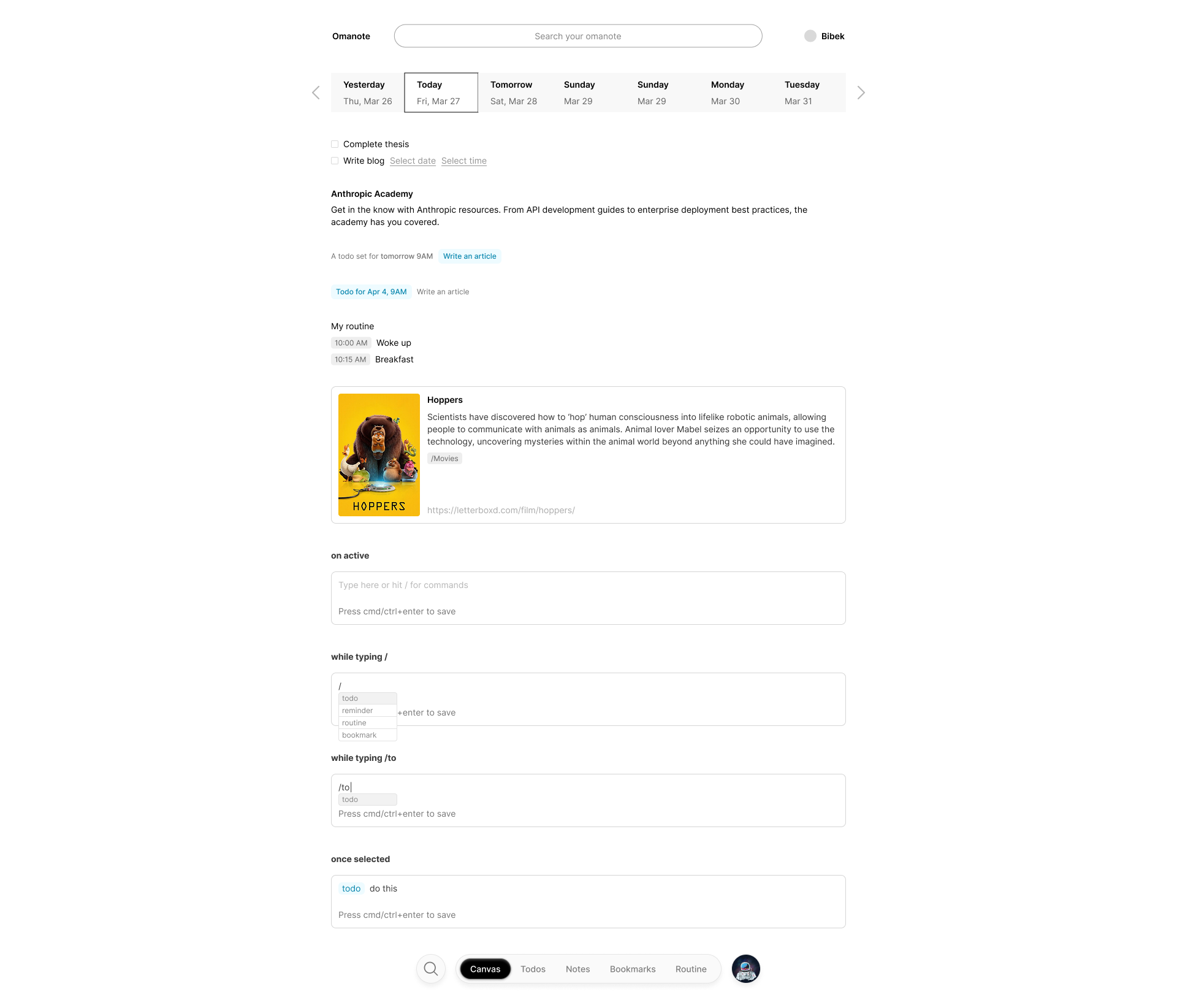
Building this tool fundamentally changed how I look design. This is the first and only design I made in Figma for quite some time. The starting foundation for what the app is today and it has evolved a lot from where it started.
My first design (looks more like a halfbaked lofi wireframe):
And this is how it looks today (as per last update date):
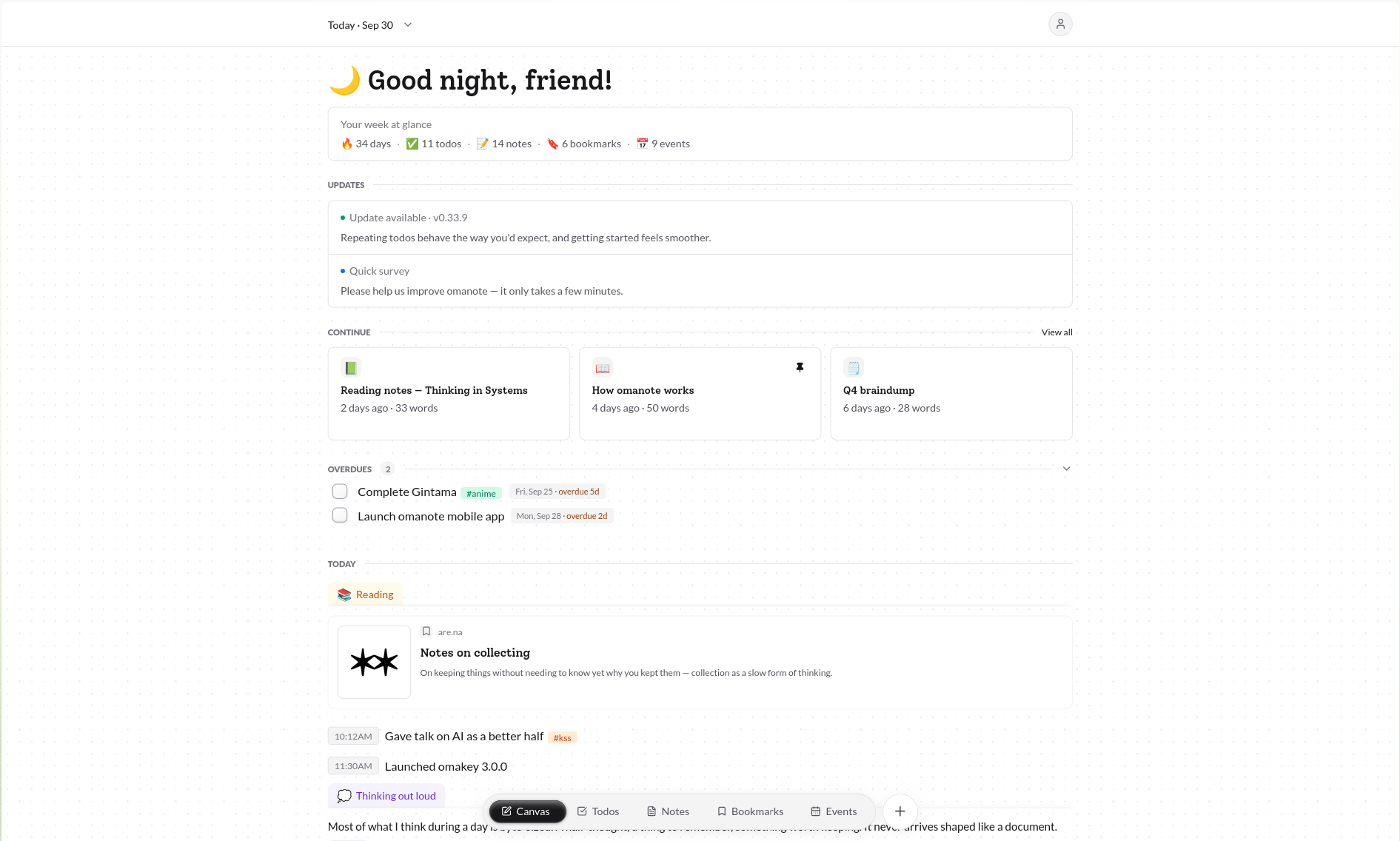
The visual direction changes every week because I learn how it should have been each time I use it and talk with friend who use it as well. Even though, the foundational architecture and app philosophy is almost same, the visuals are changing (can't say for sure if this is how it will look 2 months from now). Every new updates I push probably has 3-4 iterations in the background.
1. Design in Figma where design actually needed to happen. Not every screen. I mocked the layout system, the input patterns, and the custom components that are hard to describe in words and easy to get wrong from a prompt. Some might call it "prompting-skill-issue" but yes, I'd agree on that. The chrome pill used for nav and tabs is the clearest example. For plenty of screens it was faster and more precise to explain the direction to an agent than to mock it first. Figma was for the pieces where visual judgment had to happen in a visual tool. I design the initial idea on Figma and let Claude take it from there these days.
2. Hand that direction to an AI coding agent. Codex first, later Claude.
3. Build a token-driven design system early. Tailwind is the engine underneath, but every value the app uses is a semantic token: rounded-app-card, --app-font-serif, app-ink-muted, instead of a raw utility. I'm not a fan of Tailwind's naming conventions and I didn't want the app's visual language to be a thousand independent rounded-xl decisions. I tried building my own tool for token and component editing but I realized it wasn't worth it.
4. Research the neighbours. Notion, Capacities, Listy, Obsidian, to understand what second-brain tools get right before deciding omanote wouldn't be one. omanote isn't a "second-brain" or a wiki.
5. Write the reasoning down as I go, and make the agent work from it. Today that's roughly 11,500 lines across a PRD, a systems architecture doc, feature specs for encryption, local-first sync, Google sync, RSS, the browser extension and the canvas, two security audits, a code-quality audit, and an implementation checklist mapping every PRD line to the file that satisfies it. A lot for the AI agent to look through actually.
When I hand a feature to an agent, it starts from a document that already states the constraint.
4. Key decisions
Decision 1: End-to-end encryption, from day one
The things people put into omanote are personal by nature. If I wanted people to use this, I had to make sure I couldn't read it.The data are client-side AES-GCM-256 encrypted, with a per-user key wrapped via PBKDF2-SHA256 and AES-KW.
Decision 2: Human language for todos
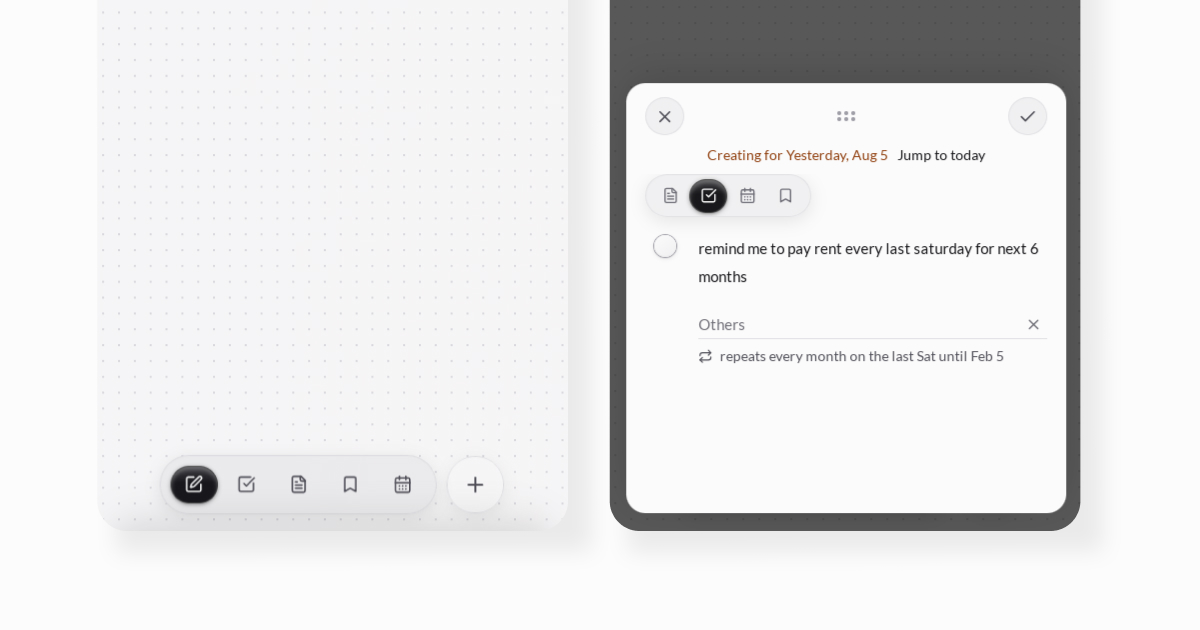
I've always liked how Slack's /remind me to finish this at 5pm tomorrow works, so todos take plain English for dates, times and repeats:
"every mon and fri" "pay rent every month on the last saturday until December" "drink water every 30 minutes for the next 6 hours"
Parsed with chrono-node plus a custom recurrence parser. The underlying rule engine is pure UTC day-number math, written that way specifically so daylight saving or a timezone change can't break it.
Decision 3: Completing a todo is an event in your life
Its a small quality-of-life feature nobody notices but I like small details like this in the apps I use. "Buy groceries" becomes "Bought groceries" when completed. There's a small in-built library that maps the past-tense of common verbs for this. Overkill, yes. Awesome, also yes.
Decision 4: No onboarding, until people started using it
I built this for myself, so I didn't design onboarding. I already knew how it worked. The reasoning was deliberate: build for the person who has the problem, ship, and let usage tell you what's confusing.
But this changed when other people started using.
The changelog was invisible. I kept shipping real features, recurring todos, Google Calendar sync, an RSS reader, and documenting every one. Almost nobody read it. People dismissed the "what's new" surface and stayed unaware of things that already existed. Yes, I could nudge people with "new feature" pop-up once in a while but that wasn't worth it. So I added the onboarding to let new user tweak the app's UI and behavior.
I also added a guide for users to read the workings of the app because this was not a typical note-taking app people are used to. Things are dumped on bite-sized input. I call the inputbox "composer" -- hit / on keyboard or press "+" to dump whats on the head and save it. There was no pages/doc like GDoc or Notion only until recently.
I also added an in-app feedback modal, with an anonymous option, rate-limited so responses stay meaningful.
Decision 5: Todo folders, added after watching a friend's workaround
The earliest version had no folders for todos. Notes and bookmarks did. Watching a friend use Google Tasks to build ad-hoc, context-specific lists, a grocery list and an outing list, made the gap obvious.
Shipped in v0.24 with sharing built in from the same release. That produced something I hadn't planned: omanote's public roadmap/plans is a shared todo folder. Roadmap items are todos, checked off as they ship. Using my own sharing feature to run the product's roadmap is the kind of dogfooding I trust more than a demo.
Decision 6: Product tour even before sign-up
omanote works differently than other similar apps. That is reason why I removed "note-taking" from all website copies (However, domain still says "note" though). And I used the app's component to build the product tour on the landing page as user scrolls through the page. Kind of forced behavior, I agree, but I'd rather have few user who resonates with how app works than just the disappointed signups.
5. Important timelines
Six months, 472 commits, v0.9 to v0.33.6. The releases that changed the product, not just the ones that polished it:
| v0.20 | Custom note editor replaced by TipTap. Rich text editing has an enormous edge-case surface and I'd been maintaining my own. |
| v0.22 | RSS fetching moved off a server-side cron onto a client-side Cloudflare Worker proxy, cutting backend data egress to zero. |
| v0.24 | Todo folders and sharing. The public roadmap starts here. |
| v0.26–0.27 | Recurring todos. Two-way Google Calendar sync. |
| v0.28 | Mobile navigation redesign: a single + composer, floating drawers, long-press to edit. Onboarding wizard. Admin PMF dashboard. In-app survey. |
| v0.30–0.31 | The canvas becomes today-fixed with in-place history. The universal composer: / from anywhere. Local-first via Dexie. Keyboard shortcuts. Contextual search with match highlighting. Custom share links. |
| v0.32 | History as its own route. First hardening audit, eight security fixes. Clean Linux desktop shutdown. |
| v0.33.0 | Images and canvas pages. The two features I'd said weren't ready. |
| v0.33.4 | New serif (Solway, replacing Aleo, which replaced Literata). Landing page rebuilt as a scroll-pinned product tour. |
| v0.33.5 | Code-quality audit. Offline durability fixed end to end. List virtualization. Around 1,600 lines of dead code removed, 12 backend endpoints deleted, 15 unused database indexes dropped, 405MB of git history purged. Six CI gates added. |
The landing page, rebuilt from the real app
Like I mentioned earlier, I wanted people to give feel of the app before they commit to it. The previous landing page had a hand-built mockup of omanote, a fake app maintained separately that drifted from the real one every release.
v0.33.4 replaced it with a scroll-pinned product tour built from the actual application components. As you scroll, a real canvas expands to fill the screen and each part gets pointed at and explained in turn.
6. Challenges
Information hierarchy got harder as the surface grew, and it never became a one-time decision. Canvas, todos, notes, bookmarks, events, RSS, Explore, Insights, History, pages. Deciding what belongs on the default canvas versus what earns its own screen is a question I still revisit. The mobile redesign in v0.28 was a direct response to desktop information density failing to translate to a small screen. The v0.33.6 mobile Events agenda was the same lesson learned again, since paging through one day at a time is a desktop idea that feels broken under a thumb.
Building a rich-text editor from scratch was the hardest technical stretch, and migrating to TipTap was the right kind of retreat. I still pay for editor edge cases. Nested list markers that changed appearance the moment you saved, past the third level, took two separate releases to properly fix.
Offline had to actually work. "Both the desktop app and the tab don't load content when there is no internet. I would not worry about the web app, but I want the desktop app to be usable when there is no internet." Drawing that line, where the desktop app must work cold with no connection and the web app gets best-effort, is what made the problem tractable. It then took the audit in 5.2 to make it true.
Trusting AI to not "slop". I've done audit, refactoring, optimization on the codebase multiple times each time a new model drops. There were several security issues, dead codes and other bugs that each audit discovered. And as functional the app can look on the surface, AI-assisted coding produces bugs I don't have expertise to detect. And this is the reason why I haven't listed on the platforms like Product Hunt. Yes, it's working for me but this isn't the best tool/app out there for people to put their personal thoughts yet. And another reason why the app is still on 0.x.x version. It's beta -- most features are half-baked, there are so many things that can be done, improved and with each usage, I am learning and fixing things as I go.
7. Design details worth zooming in on
The date strip I removed after watching usage. An earlier canvas showed a horizontal strip of several days. It seemed like the obvious way to let people glance at nearby dates. But almost nobody went back that way, and the strip was permanently eating vertical space on every visit for a navigation pattern people barely used. I replaced it with a single date, "Today · May 25". The date browsing didn't disappear. It became History, which is now a real page instead of a tax on every load.
Empty states are written per-surface. Todos: "Nothing is scheduled for today yet." Events: "Today seems eventless so far," with a "Log your event" button. When a new user's week shows zero activity, it doesn't show a zero, it shows "Save your first thought, todo or link." A zero reads as a verdict on someone who hasn't done anything yet.
Today counts as a streak. When I noticed a new user's streak read 0, I changed it. They showed up, so it's 1.
Accessibility, honestly assessed. App-wide content zoom (Cmd/Ctrl with =, -, 0, 70 to 150% in 10% steps) scales the root font size so it cascades through the whole rem-based layout instead of only resizing text. And for mobile webapp, the swipe gesture to switch between the tabs is a nice addition.
Guest emails are masked on shared screens. Screen-sharing shouldn't leak someone else's address.
Dynamic greetings, rotated deterministically by date so the canvas feels alive, something I've always loved in the app.
Instead of marketing, I built an admin PMF dashboard whose purpose is to stop me misreading the numbers. Three metrics, among many others, help me with:
- Founder-share of activity. What percentage of all recorded usage is my own account, with warning and critical thresholds at 35% and 60%. It exists specifically to catch me calibrating product intuition on a sample of one.
- One-day-only usage share. Flagged in the code itself as "the single best early PMF indicator". People who show up once and never return.
- A survey-answer-to-behaviour cross-tab. Whether someone answering "very disappointed" to the Sean Ellis question actually retains better and closes more todos, or whether it's just a pleasant thing to say in a survey.
On monetization, I'm undecided and would rather say so than invent a plan. No billing exists yet, deliberately, because retention comes before revenue. If I do charge, the likeliest shape is gating the newer, heavier features, image storage above the free 200MB and deeper calendar sync, while leaving core capture alone. That's a direction rather than a decision. The 200MB cap that shipped with images is the first time the question has had a real edge to it. Only when I can be sure the app doesn't have AI-slop anywhere, I'd version tag it 1.0.0.
9. What I learned building omanote
Having an engineering background changed what kind of designer I could be here. I couldn't have hand-coded the full app. But the foundational knowledge let me ask better questions: the refactor questions, the question about why we weren't using semantic tokens, the pushback on a proposed data model, and the ability to follow one architectural decision (end-to-end encryption) all the way down to its consequences in recurring todos, local-first sync. Most of this case study's key decisions exist because I could see that far into the system.
I still coded minor things by hand when explaining was slower than doing. Most of the app came from directing agents. Not all of it. Getting the canvas and other pages to go full height, when the bottom nav's own height was eating that space, or tweaking the right amount of shadow, corner-radius, or any visual tweak was much faster hands-on than asking agent.
Functional before pretty. It would have been easy to spend six months polishing surfaces. Instead I built the working version and let polish follow real usage. The mobile redesign, the onboarding wizard, the date-strip removal and the History rewrite all happened after I had something people could use and I could watch them use it. The landing page is the same instinct pointed outward: a live product tour instead of screenshots, so someone gets a feel for how it behaves before they sign up.
Documentation is infrastructure when your collaborator has no memory. The PRD, the architecture doc, the audits and the handoff files aren't for a future teammate. They're for the agent I'll be talking to next week, which will arrive knowing nothing.
Appendix A: stack
Frontend. React, Vite, TypeScript, React Router. Tailwind as the engine, with a semantic token layer on top and a CI gate that audits token usage. TipTap for rich text, chrono-node for natural-language dates, dompurify for sanitizing rendered content, react-markdown with remark-gfm, lucide-react, emojilib.
Backend. Convex. Clerk for auth and JWT.
Local-first. Dexie for the IndexedDB cache, cursor-based sync, and the durable write outbox.
Storage. Cloudflare R2 for images, encrypted client-side. Convex file storage for share thumbnails.
Edge. Three Cloudflare Workers: an authenticated RSS proxy, a link-preview service with SSRF guards, and an image service for canvas pages.
Cross-platform. Tauri for desktop (Mac, Windows, Linux), a Chrome and Firefox MV3 extension, Expo and React Native for mobile (currently dormant).
Infra. Vercel, web-push for notifications, Google Calendar API for two-way sync, and error monitoring on my own backend instead of a third party, since sending stack traces from an end-to-end encrypted app to someone else's service would contradict the premise.
Testing and gates. Vitest, Testing Library, convex-test, jsdom. 159 test files, 1,338 tests. Six CI gates: typecheck, design-system tokens, dead code (knip, with a ratchet so the count can only fall), Convex module inventory, documentation coverage, and version drift across the four desktop version files.